



Laser Cutting Acrylic: Edges, Thickness and CNC
A CO2 laser cuts flat acrylic profiles with a clear edge straight off the bed. It cannot make pockets, chamfers or counterbores, and thick stock slows it down.
Need this made?Acrylic laser cutting service →
Here is where each process fits.
Key Takeaways
- Laser cutting acrylic uses a CO2 beam that PMMA absorbs well; with the right power and speed the cut edge melts smooth and clear, so many flat parts need no edge polishing.
- Cutting depth scales with laser power: Epilog's published guide runs from 1/8 in on a 30–40 W laser to 3/4 in in one pass on a 200 W laser. Thicker stock is usually CNC routed.
- A laser only cuts through. Pockets, chamfers, counterbores, stepped faces and controlled bores need CNC routing, and many assemblies use both processes.
- Our standard working tolerance is ±0.2 mm; fit-critical 2D dimensions can be held to ±0.1 mm after drawing review. Dimension the finished part, not a guessed kerf offset.
- Buying decisions based on 'laser sounds precise' or 'CNC sounds industrial' — rather than actual part requirements — are the most common spec mistakes I see on new B2B inquiries.
On this page
Laser Cutting Acrylic: How It Works
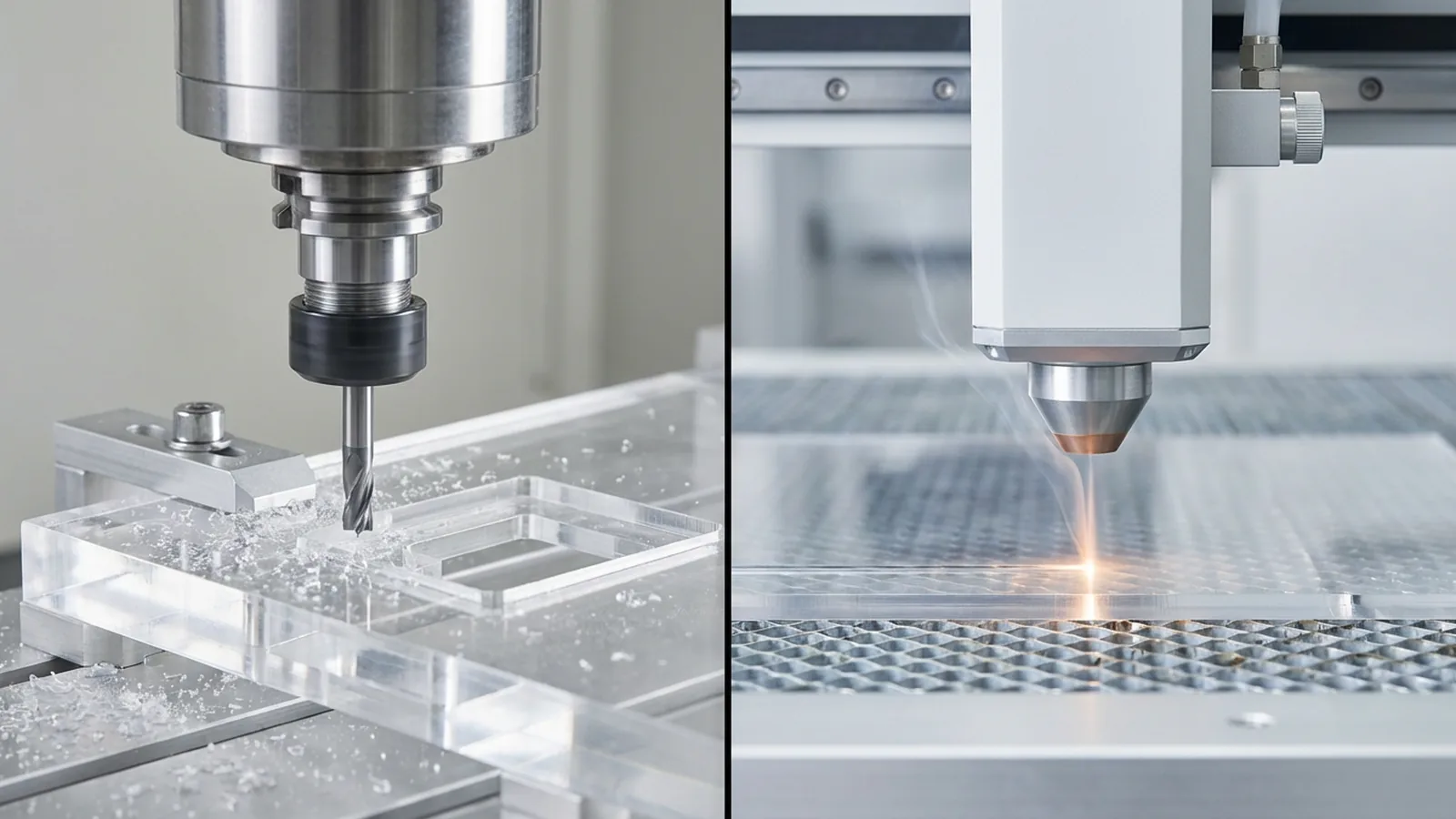
Laser cutting acrylic uses a focused CO2 laser beam to vaporize PMMA along a vector path. Acrylic strongly absorbs the CO2 laser’s 10.6 µm wavelength, so the beam cuts flat profiles with a narrow kerf and, at the right power and speed, leaves a smooth, clear edge that often needs no polishing. It cannot cut pockets, chamfers or counterbores; that is CNC work. Cutting is one step of acrylic fabrication; the rest of the route is decided in the same quote.
The beam melts a very thin layer at the cut face as it passes. That melted layer re-solidifies glossy, which is why laser-cut acrylic edges are often called “flame polished.” Epilog, a US laser manufacturer, describes the right combination of speed, power and frequency as leaving the edge “crystal clear and perfectly smooth”1.
We run 8 laser cutters and 4 CNC machines under one roof. If you already have a drawing, our acrylic laser cutting service page covers files, samples and production; parts that need pockets, bores or thick-stock geometry go through acrylic CNC machining.
A few practical points buyers ask about:
- Clear acrylic needs a CO2 laser. Clear sheet passes visible light, which is why low-power blue diode lasers struggle to cut it. Production shops cut acrylic on CO2 machines.
- Fumes need extraction. Epilog warns that vaporized acrylic produces strong fumes and fine particles and should never be cut without proper ventilation1.
- Engraving and cutting happen on the same machine. A laser can mark a logo or part number and cut the outline in one setup, which is why laser-cut parts are common for signs, inserts and display panels.
What Thickness Can a Laser Cut in Acrylic?
Cutting depth depends on laser power. Epilog’s published guide lists 1/8 in (about 3 mm) on a 30–40 W laser, 1/4 in (about 6 mm) on 50–60 W, 3/8 in (about 9.5 mm) on 80–100 W, 1/2 in (about 12.7 mm) on 120 W and 3/4 in (about 19 mm) on 200 W in a single pass1.
Two things change as the sheet gets thicker. The cut slows, and the edge can show a slight taper and heat marks. Most display, sign and insert work sits in 2–10 mm sheet, which is where laser cutting acrylic is most efficient. For thick blocks and bases, I normally route the part on CNC and polish the edge instead. Our acrylic thickness guide covers how to choose the sheet in the first place.
Laser-Cut Acrylic Edge Quality
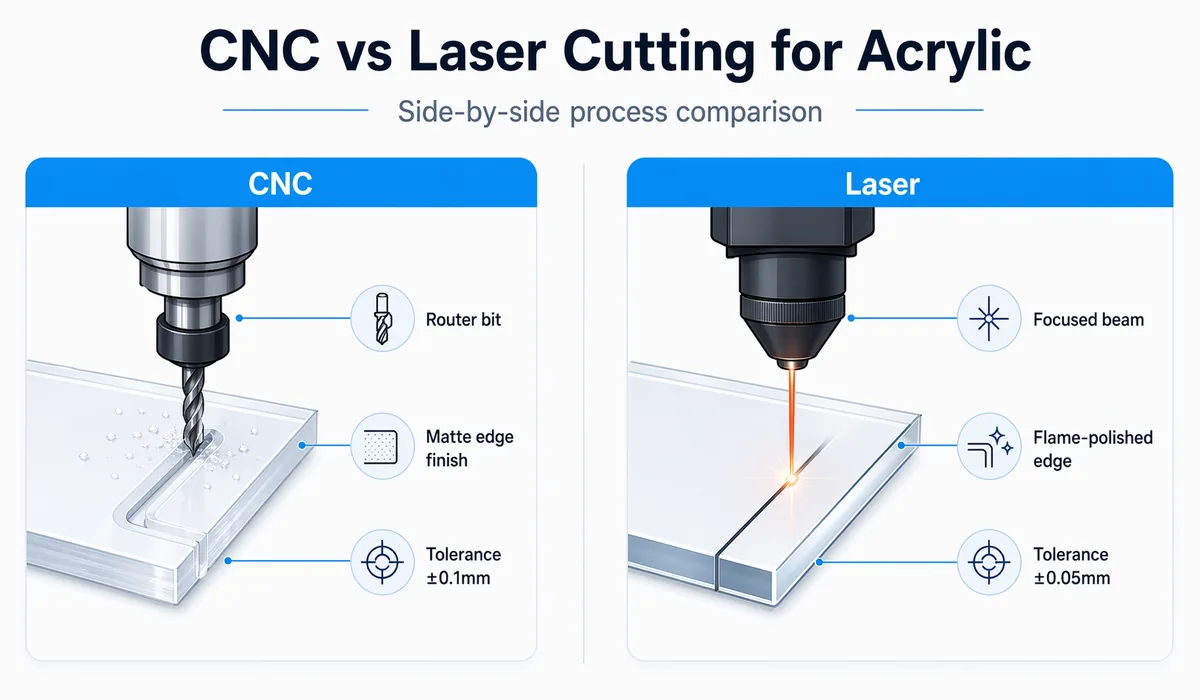
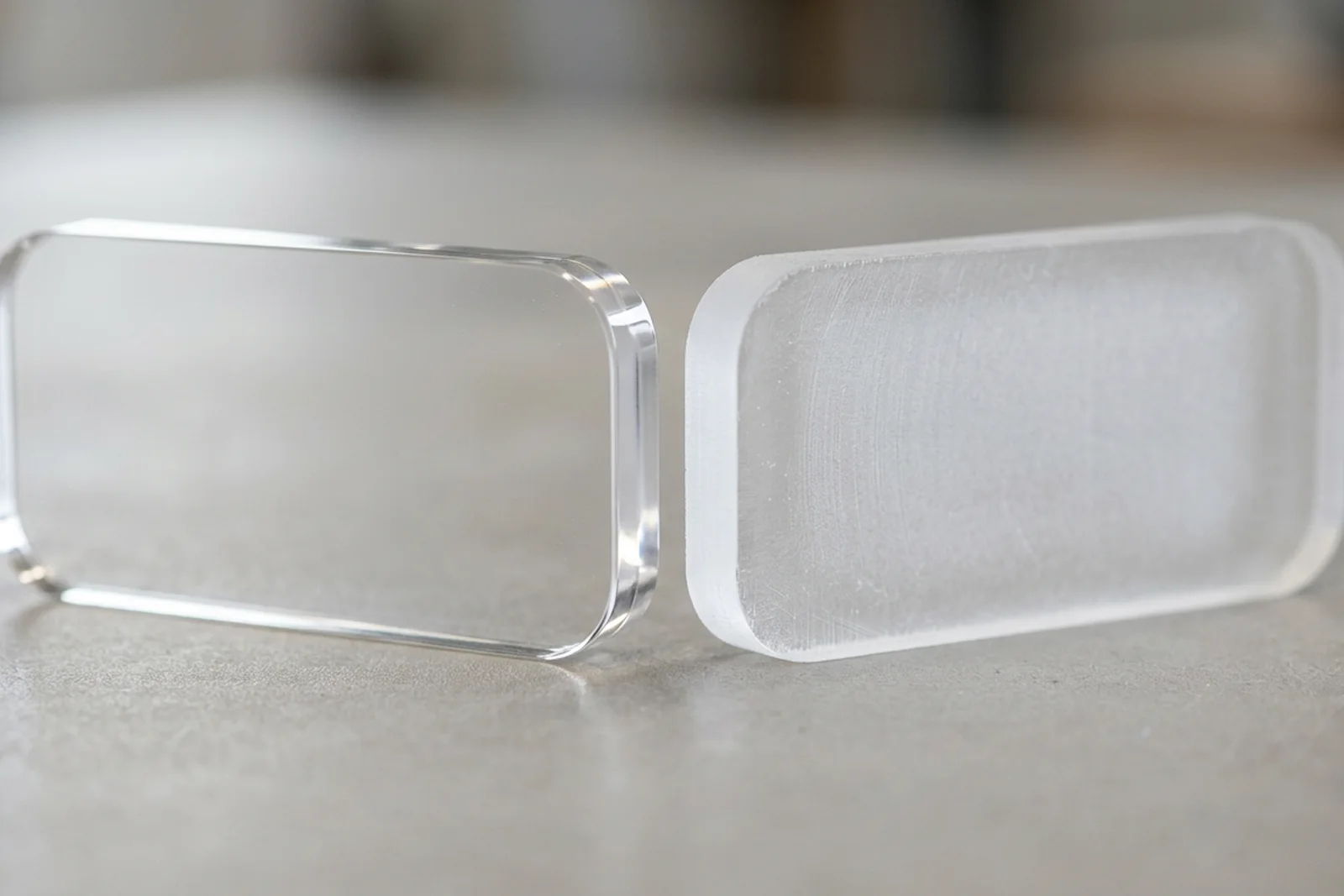
A well-tuned laser leaves a glossy, clear edge on acrylic with no separate polishing step. A CNC-routed edge is matte and is diamond or flame polished if it shows. The laser edge is not perfectly square on thick sheet and carries heat stress, so it may not suit parts that will be solvent bonded.
Sheet type matters too. Epilog notes that extruded acrylic cuts cleanly with a flame-polished edge, while cast acrylic engraves to a frosty white, which makes cast the usual choice for engraved logos1. Sheet producers such as Plaskolite document the thermal and cutting behavior of cast and extruded PMMA by grade and thickness2, and our cast vs extruded acrylic guide explains the difference in more detail.
What I look for when a buyer says “the edges must look perfect”:
| Edge requirement | Usual route |
|---|---|
| Visible perimeter on flat sheet, gloss is fine | Laser cut, no polish |
| Mirror-flat, square edge on thick sheet or blocks | CNC route, then diamond polish |
| Tight inside curves that must be clear | Laser cut, or CNC plus flame polish |
| Edge that will be solvent bonded | Review on the sample; heat-stressed edges can craze |
| Hidden edge (inside a frame or base) | Either route, no polish |
For side-by-side edge photos and defects to watch for, see our acrylic edge finish reference and diamond vs flame polishing acrylic. How we check the finished edge against the approved sample is set out in our edge finish standard. Across plastics fabrication, visible finish inconsistency, cloudiness and dimensional variation at the edge are among the most common reasons parts are rejected; correct process selection and machine calibration are the upstream controls, and polishing is a correction, not a substitute.
Kerf, Tolerance and File Setup
Kerf is the width of material the beam removes. Cut Laser Cut, a UK laser-cutting service, publishes acrylic kerf of about 0.18 mm on 1–3 mm sheet, 0.21 mm on 5–8 mm, 0.30 mm on 10–15 mm and 0.32 mm on 20 mm3. The cutting program compensates for it, so your drawing should show finished dimensions.
| Acrylic thickness | Typical kerf |
|---|---|
| 1–3 mm | about 0.18 mm |
| 5–8 mm | about 0.21 mm |
| 10–15 mm | about 0.30 mm |
| 20 mm | about 0.32 mm |
Our standard working tolerance is ±0.2 mm. Fit-critical 2D dimensions, such as slots that take a mating panel, can be held to ±0.1 mm after drawing review; mark them on the drawing so they are measured at inspection. Our tolerance standard explains how each class is checked.
File setup decides most first-sample problems. Send a vector file (DXF, AI or vector PDF) at 1:1 scale with one revision, plus a dimensioned PDF. Our CAD files for custom acrylic parts guide lists the common file errors.
When CNC Routing Is the Better Route
Choose CNC routing when the part needs anything a beam cannot do from above: pockets, chamfers, counterbores, stepped faces, controlled bores, or cuts in stock thicker than the laser handles well. Choose laser cutting acrylic for flat through-cut profiles in sheet, where the clear as-cut edge saves a polishing step.
| Factor | Laser cutting acrylic | CNC routing acrylic |
|---|---|---|
| How it cuts | CO2 beam vaporizes the cut line | Spinning carbide or diamond tool mills material |
| Edge as cut | Glossy and clear on a tuned cut | Matte with tool marks |
| Polishing | Often none on visible edges | Diamond or flame polish if the edge shows |
| Features | Through-cuts, engraving | Pockets, chamfers, counterbores, steps, bores |
| Inside corners | Nearly sharp, limited by kerf | At least the tool radius |
| Thick stock | Slows and tapers near the power limit | Handles thick sheet and blocks |
| Heat | Heat-stressed edge | No heat edge; mechanical stress from tooling |
Many products use both. A retail display may have laser-cut shelves and sign panels on a CNC-routed thick base with pockets for magnets. In our CNC base program for a German OEM, the bases were machined, while projects such as our custom packaging inserts were laser cut from sheet. The quote should name the process and edge finish for each part.
Ordering Laser-Cut Acrylic Parts
The price of a laser-cut part is set mainly by sheet grade and thickness, total cut length, how many parts nest on one sheet, any engraving or printing, and whether an edge needs polishing. Quantity lowers the unit price because more parts share the setup and the sheet.
For custom production we work from 100 pieces per design. Paid samples take 3–5 days and cost USD 200–500 depending on complexity; the fee is paid separately and never credited to the production order. Production runs 15–20 days after sample approval, FOB Shenzhen by default. For display parts, see our acrylic display stands; for card-shop fixtures, the trading card display application lists the fit questions to supply. The full range of cutting and finishing options is on our custom acrylic fabrication page.
When I review a laser RFQ, the first thing I look for is which edges show. That one detail decides whether a part can ship as cut or needs a polishing step, and it changes the quote. Send the file, quantity and visible-edge notes to inquiry@wetopacrylic.com, and we reply within 24 hours with the cutting route and edge finish named for each part.
Footnotes
-
Epilog Laser — Laser Cutting and Engraving Acrylic — laser manufacturer’s application guide; source for the single-pass thickness by wattage table, the cast vs extruded behavior (extruded cuts with a flame-polished edge, cast engraves frosty white), the clear-edge settings, and the fume and ventilation warning. ↩ ↩2 ↩3 ↩4
-
Plaskolite PMMA technical resources — US-based acrylic sheet manufacturer; their technical library documents cast and extruded PMMA thermal properties, cutting behavior, and thickness-specific fabrication guidance that informs our process parameter selection. ↩
-
Cut Laser Cut — Laser Kerf — UK laser-cutting service’s measured kerf table by material and thickness; source for the acrylic kerf values from 0.18 mm on 1–3 mm sheet to 0.32 mm on 20 mm. ↩
Frequently Asked Questions
Is laser cutting or CNC better for acrylic?
Laser cutting is usually the faster, cleaner route for flat through-cut profiles in sheet up to roughly 1/2 in, because the edge comes off clear. CNC routing is better for pockets, chamfers, counterbores, thick blocks and fit-critical bores. Many products use both: laser for panels, CNC for bases.
What thickness can you laser cut acrylic?
It depends on laser power. Epilog's published guide lists 1/8 in for a 30–40 W laser, 1/4 in for 50–60 W, 3/8 in for 80–100 W and 1/2 in for 120 W in a single pass, up to 3/4 in in one pass on 200 W. Edge quality drops as you approach the limit, so thick parts are usually CNC routed.
Does CNC routing leave a clean edge on acrylic?
No. A routed edge is matte with fine tool marks. If the edge is visible it is normally diamond polished or flame polished afterward. Mark which edges show on the drawing so the quote includes the polishing step.
Which acrylic cutting method is cheaper?
For flat sheet parts, laser cutting is usually cheaper because there is no tool change and no edge polishing step. For thick stock or 3D features, CNC is the only practical route. Compare quotes on the same drawing, quantity and edge finish.
Can the same acrylic project use both laser and CNC?
Yes, and many do. A display might have laser-cut shelves and a CNC-routed thick base with pockets. The approved drawing should name the process and edge finish for each part, and the sample should be checked as an assembly.
What should a laser cutting acrylic RFQ include?
A vector file (DXF, AI or vector PDF) with one revision, a dimensioned PDF, the material grade, color and thickness, quantity per design, which edges are visible, critical dimensions, and packing and shipping terms.
When is a test cut needed for thin acrylic sheet?
When the grade, color, coating or a fine feature is new, or when a visible edge matters commercially. Colored, mirrored and coated sheets can behave differently from clear sheet under the beam, so check the actual edge before production.
When should thick acrylic stock be CNC routed?
When the stock is near or beyond the laser's single-pass range, when the edge must be square and polished rather than slightly tapered, or when the part needs pockets, counterbores or datum faces.
Can CNC make pockets and chamfers in acrylic?
Yes. Pockets, chamfers, counterbores, stepped faces and relief carving are CNC work, subject to tool access and the wall left around the feature. Inside corners of a routed pocket carry at least the radius of the cutting tool.
How should laser kerf be shown on an acrylic drawing?
Dimension the finished feature, not a kerf offset. Kerf in acrylic is a few tenths of a millimeter and grows with thickness; the fabricator compensates for it in the cutting program, and inspection checks the finished part against your drawing.
What evidence should approve laser or CNC edge quality?
A paid sample cut from the named sheet with the production settings, checked for edge appearance and critical dimensions. Samples take 3–5 days, cost USD 200–500 depending on complexity, and the fee is never credited to production.
Not sure if your part should be laser cut or CNC routed?
Send the vector or CAD file and quantity. We name the cutting route and edge finish for each part in the written quote. Cut-edge samples are paid separately (USD 200–500) and never credited to production.