---
title: "Proof Approval Process Manufacturing: Reseller Guide"
description: "The proof approval process manufacturing resellers need: signable PDF proofs, version naming that survives five rounds, and which revisions trigger setup cost."
category: "Buyer Guide"
author: "Amy Liu"
authorCredential: "Client Account Manager at Wetop Acrylic — coordinating B2B orders from first inquiry through delivery since 2020, 500+ custom projects handled"
datePublished: 2026-08-22
dateModified: 2026-08-22
primaryKeyword: "proof approval process manufacturing"
url: https://wetopacrylic.com/guide/reseller-proof-approval-version-control/
---
## What a digital proof approves before an acrylic order runs {#what-a-proof-locks}
Two PDFs, both named final. The end client signed one; the factory received the other; and the difference between them surfaces only when finished pieces come out of the carton wrong. That recurring mixup is what a digital proof gate exists to prevent — and it is why the proof approval process manufacturing resellers run with us locks four things before any machine starts: the artwork version, its placement, the color and finish callouts, and the dimensions as drawn. This guide covers digital proofs only.
I coordinate proof rounds for reseller and print-shop orders every week, and the mixups I untangle almost never involve a bad file. They involve two good files — an approved one and a nearly identical one — separated by a text edit, a logo nudge, or a size change that lived in somebody's outbox instead of in the proof. The digital proof is the last point in a custom order where catching that difference is free. After approval, the same difference is rework.
Two neighbors of this topic have their own guides, and the fences matter. How the artwork file itself gets press-ready — outlined fonts, layer separation, the dieline — is covered in our [artwork file readiness guide](/guide/artwork-file-readiness-custom-acrylic/). What to check on the physical sample once one exists is the [pre-production sample approval checklist](/guide/pre-production-sample-approval-checklist/). This guide owns the paperwork between those two: who signs, what they sign, how versions stay straight, and what a revision costs.
---
## The three-party problem: you approve for a client who isn't in the room {#three-party-problem}
A reseller order has three parties and only two of them ever talk. Your end client owns the artwork opinion, you own the purchase order, and we own the machines — so every approval crosses two relationships before it reaches a production line. The proof has to work as a document the end client can judge alone, with no factory vocabulary that needs translating in either direction.
That constraint shapes the format. A proof built for a designer assumes layers, spot colors, and a trained eye; a proof built for a downstream customer assumes none of that. What that customer needs is a single page that looks like the product they are buying, annotated in plain terms, that they can mark up and sign in software they already have — the commenting tools in any standard PDF reader handle sticky notes, text boxes, and freeform drawing marks[^acrobat-comments], which is all a sign-off requires.
The question I hear most from print-shop buyers is not about the artwork at all; it is about who clicks approve. Our answer is deliberately rigid: one named approver per order, on the reseller's side of the relationship. Five opinions may come back from the client's team, but one person consolidates them into the proof round. Orders where "whoever replies first" approves the proof are the orders where two contradictory approvals exist by round three — and on [custom display programs](/products/acrylic-displays/) with several stakeholders, that discipline is worth more than any file convention.
---
## What a signable PDF proof contains {#signable-pdf-proof}
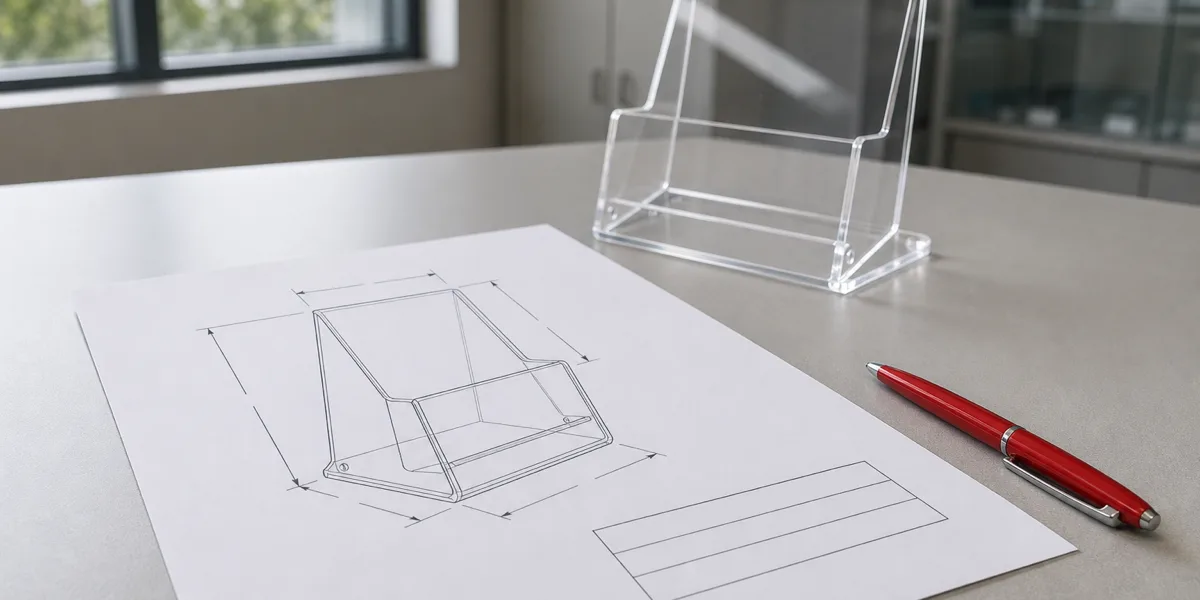
A signable proof is one page per product, and it carries six blocks: the product drawn on its dieline, overall dimensions, print placement marked from named edges, color and finish callouts, the version name with its date, and an approval line naming who signs. If any of the six is missing, the sign-off is an opinion about a picture — not a release document.
The signable page: the product drawn on its dieline with dimensions and a signature block, next to the acrylic piece it describes. An end client can judge this document without opening a single design tool.
The proof is deliberately not the production file. Press-ready print data has its own standardized container — PDF/X-4, standardized as ISO 15930-7, restricts PDF features precisely so print files behave predictably between systems[^pdfx4] — but that file is built for machines and prepress staff. The proof PDF is the human-readable twin: flattened, annotated, small enough to forward, and useless for production on purpose. Your end client never needs to open the press file, and nothing they do to the proof can corrupt what the printer runs.
The block that earns its space is the placement drawing. "Logo on the front" reads as obvious until the front of a folded acrylic stand is genuinely ambiguous — so the proof dimensions each mark from a named edge, states which face carries the print, and shows orientation. Buyers who have been through one placement dispute recognize this block immediately; a marked-up proof and a written approval are what settle image size and position before production instead of after it.
---
## Version naming that survives five rounds {#version-naming}
The naming rule is one sentence: no file in a proof round is ever named final. A version name that survives five rounds is canonical and incrementing — job, product, revision — so TRAY-0611-R1 becomes R2 and R3 without ever mutating into final, final2, or FINAL-approved-USE-THIS. The name's job is to make the newest version impossible to confuse with its ancestors.
Since 2020, I have never seen a five-round proof cycle fail at round five. It fails at round two, when the revised file quietly keeps the first version's name, and every message after that says "the proof" while two documents answer to it. So our rounds run on three mechanics: the version name prints on the proof sheet itself, the email subject carries the same name, and the superseding message retires the old version in writing — "R2 replaces R1; please discard R1" costs one line and removes the ancestor from circulation.
A proof cycle that survives revisions: gray versions are retired in writing, the blue version is the only live document, the green gate is a named approver signing in writing — and any change after the gate reopens the cycle as R4, with setup re-quoted only if the dimensions moved.
Version discipline is not a courtesy habit; it is document control, the same requirement our ISO 9001 quality system[^iso9001] applies to drawings and specs inside the factory. The reseller payoff arrives months later: when your client reorders, the purchase order can say "as approved, TRAY-0611-R3" and skip the artwork conversation entirely — the approved proof is the contract's picture, on the reorder as much as on the first run.
---
## When a revision is free — and when it triggers new setup cost {#revision-cost-triggers}
The rule that surprises resellers most: revisions are not priced by how big they look, but by what they touch. While the proof is digital and unapproved, edits that stay inside the existing outline cost a proof round and nothing else. Edits that change the outline change the tooling — and tooling is where setup cost lives.
| Change requested | What it touches | Cost effect |
|---|---|---|
| Text edit, logo swap, artwork repositioned within the same outline | Print data only | Free — new proof version, no setup change |
| Color or finish callout revised before approval | Print data and process notes | Free — new proof version |
| Size or shape change, new holes or slots | New dieline, new cutting program, often new jigs | Setup re-quoted before we proceed |
| Thickness or material change | New cutting parameters, sometimes new print fixture | Setup re-quoted before we proceed |
| Any change after written approval | Reopens the gate — R4 proof round | Free if print-only; setup re-quoted if the outline moved |
The mechanics behind the table are physical. A logo that moves 10 mm left changes ink placement and nothing else; our UV printers simply follow the new file. A stand that grows 20 mm wider changes the cut path on our laser and CNC lines, the nesting layout on the sheet, and possibly the fixtures that hold the piece during printing — the same preparation work the first version needed, done again. That is why a "small" size tweak can carry a charge while a dramatic artwork overhaul is free: the cost follows the tooling, not the visual drama.
What we owe the reseller at that moment is a plain-language explanation before the re-quote, and this is the part I refuse to let a proof round skip. When a client revision crosses from print into tooling, we say so in the proof email — which change triggered it, what gets rebuilt, and what it does to the clock — so the reason travels downstream with the number. A revision the end client understands is a revision they can decide on; a surprise charge two rounds later reads as a factory problem even when it is a physics problem.
---
## Duplex inserts and multi-SKU programs: proof gates that scale {#duplex-multi-sku}
Two kinds of orders stress a proof workflow harder than any single-piece job: double-sided printed inserts, and programs where one purchase order carries many SKUs. Both are reseller territory, and both are managed with the same move — more granular gates, not more paperwork per gate.
A duplex insert — printed front and back, viewed from both sides in a frame — travels as two pages of one versioned document, never as two loose files. That single habit is what keeps the faces registered through revision rounds: when page one increments to R3, page two increments with it, and no combination of old front with new back can slip through. The digital proof locks both pages and their orientation; because printed color is a different question from screen color, duplex work then earns a second gate — one printed insert, approved before bulk printing runs. On [magnetic photo frame programs](/products/acrylic-frames/acrylic-magnetic-frames/) this two-gate pattern is our default recommendation, and the file-preparation side of duplex printing — resolution, registration, pocket sizing — belongs to the [artwork readiness guide](/guide/artwork-file-readiness-custom-acrylic/).
Multi-SKU programs scale the other axis. Five display models on one PO means five proofs, five version clocks, and — without discipline — one spreadsheet nobody trusts by week two. We track per-SKU version status on our side and report it per round: which SKUs are approved, which are waiting on comments, which are in revision. The practical payoff is that approved SKUs can release to production while a straggler finishes its rounds, instead of the whole program idling behind the slowest sign-off.
---
## Proof approval is the moment your ship date becomes real {#proof-ship-date}
Every date on a quote is an estimate until the proof is approved. Written approval of a named version is the event that starts the clocks we actually commit to: samples ship in 3–5 days, production runs 15–20 days, and the 30% deposit keys to the same gate, with the 70% balance due before shipment. Asking "can you confirm the ship date" before approval is asking us to promise arithmetic on a start line that has not happened yet.
For a reseller holding a delivery promise to an end client, that changes how the calendar gets spent. The cheapest acceleration available is not a rush fee; it is round compression. Three comments delivered as three separate emails create three proof rounds; the same three comments consolidated by the named approver create one. I have watched identical revisions cost one round on a disciplined order and three rounds on a loose one — same artwork, same factory, two calendars.
The second lever is sequencing the physical gate honestly. Where the order includes a sample — and for first-run products it should — the digital proof gates the sample, and the sample gates bulk, per the [pre-production checklist](/guide/pre-production-sample-approval-checklist/). Resellers who forward our proof to their client while the sample ships, instead of serializing the two waits, routinely recover most of a week without touching production speed at all.
---
## The proof workflow we run for reseller orders {#wetop-proof-workflow}
Here is the sequence as your project will actually experience it. You send artwork or a reference photo; we respond within 24 hours with questions or a quote. Once the files clear preparation, we issue the versioned PDF proof — signable, forwardable, one page per product. Rounds run until your named approver signs a version in writing. That approval releases the sample where one is ordered, then production, with 100% piece-by-piece inspection against the approved documents before packing.
The pattern holds at reorder scale, which is where reseller programs live or die. A US print lab's [photo-block program](/case-studies/acrylic-photo-blocks-print-lab-bulk-order/) is on its third purchase order in 12 months — 2,400 blocks in the latest run — and those reorders start from the retained approved spec, not from a fresh artwork negotiation. That is what the version name buys: eighteen months from now, "as approved, R3" still points at exactly one document, and your client's reorder is a quantity conversation instead of a design one.
We built this workflow because reseller orders fail differently than direct orders — not at the machines, but in the space between three parties who never share a room. If you are quoting a custom acrylic program to your own client right now, [send us the artwork and ask for a versioned proof](/contact/?source=reseller-proof-approval-version-control) — you will have a signable PDF and a quote inside 24 hours. Still shaping the product itself? [Start with our customization team](/customization/) and the proof round will meet you when the design settles.
[^acrobat-comments]: [Add comments to PDFs — Adobe Acrobat help](https://helpx.adobe.com/acrobat/using/commenting-pdfs.html) — Adobe's documentation of PDF commenting tools (sticky notes, text-box comments, shapes and freeform drawing markup), supporting the claim that an end client can mark up a proof PDF with standard reader software and no specialist tools.
[^pdfx4]: [What is PDF/X-4 — Prepressure PDF basics](https://www.prepressure.com/pdf/basics/pdfx-4) — prepress reference page documenting PDF/X-4 as ISO standard 15930-7:2008, a restricted PDF format whose rules exist to make print files behave predictably between systems; supports the proof-versus-press-file distinction.
[^iso9001]: [ISO 9001:2015 Quality management systems — Requirements](https://www.iso.org/standard/62085.html) — the quality-management standard our factory is certified against; its documented-information requirements are the in-factory counterpart of the version-control discipline described for proof rounds.