---
title: "Etched Logo on Acrylic Trays — A Brand Buyer's Spec Sheet"
description: "Etch depth, substrate thickness, paint-fill register, vector-art prep, per-sq-inch pricing — the specs that decide if your etched acrylic logo lands."
category: "Manufacturing"
author: "Dillion Chen"
authorCredential: "Production Manager at Wetop Acrylic — running laser, CNC, polishing, and UV printing lines since 2014, 1,500+ custom projects personally overseen"
datePublished: 2026-05-05
dateModified: 2026-05-05
primaryKeyword: "etched acrylic logo"
url: https://wetopacrylic.com/guide/etched-logo-acrylic-trays-spec/
---
I run our laser line on the production floor, and the message I send to brand buyers most often is: "Your logo will read on the tray. It just may not read the way you imagined." The reason is rarely the laser, the operator, or the artwork in isolation. It is the way etch depth, substrate thickness, color-register choice, and vector-art prep interact — and most B2B buyers spec only one of those four on the RFQ.
This guide is the spec sheet I would hand a brand procurement lead before they sign off on a sample for an etched acrylic logo. Numbers come from our own etch-test grids, paint-adhesion cycle data, and 200+ branded tray jobs we have shipped in the last three years. For broader product context, start at our [acrylic trays hub](/products/acrylic-trays/). For a worked customer example, the [bespoke acrylic tray artwork integration case study](/case-studies/bespoke-acrylic-tray-artwork-integration/) walks through one brand's rollout end to end.
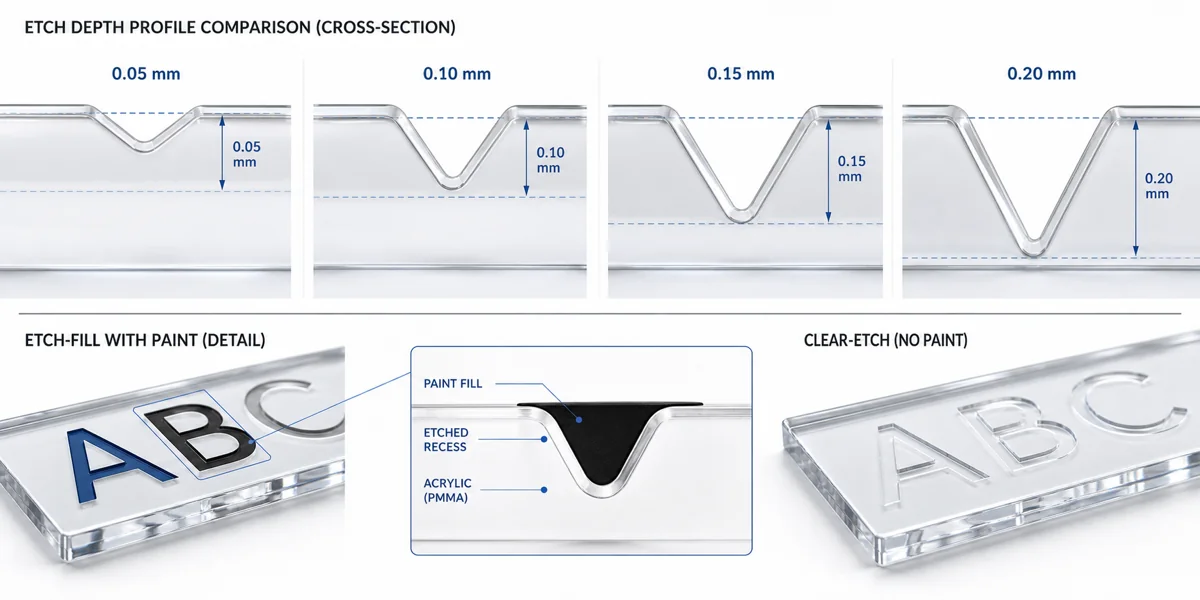
Four etch depths cross-sectioned at 5mm substrate. Each step deeper changes how the logo reads under raking light — and at 0.15mm we cross from "subtle frost" into a channel deep enough to hold paint pigment.
---
## Etch depth — what 0.1mm vs 0.2mm actually looks like {#etch-depth}
The single biggest disconnect between what a brand designer pictures and what shows up on the first sample is etch depth. The artwork file says nothing about depth — it is a 2D vector — so the laser operator picks a depth based on convention or the prior job. If you don't spec it, you get whatever the machine ran last.
I ran a 4-grid test last month — 0.05, 0.10, 0.15, and 0.20 mm depth on a 5mm cast PMMA substrate, etching the same vector logo at each — to put numbers under what each one looks like in the hand:
Each step deeper changes how the logo reads. At 0.15 mm the channel becomes deep enough to hold paint pigment; below that the etch is a frosted contour only.
**0.05mm** reads as a tone-on-tone whisper. Under flat overhead lighting it is nearly invisible; angle the tray and the logo appears as a soft frosted contour. The depth I recommend for ultra-premium work where the logo is meant to be discovered rather than announced — luxury cosmetics, hospitality trays, gift packaging where the brand is already on the box.
**0.10mm** is the workhorse. Visible under normal interior lighting, holds detail down to about 0.2mm stroke width, and leaves the surface flat enough that glasses sit clean across the etched area. Roughly 70% of our etched-tray jobs run at this depth — if you don't spec, this is what you'll get.
**0.15mm** crosses into "you can feel it." Run a fingernail across and you'll catch on the channel edge. The minimum depth I recommend for paint-fill — shallower and the pigment doesn't hold a clean meniscus.
**0.20mm** is recessed enough that under raking light the logo casts a contour shadow, which reads as visual weight or as a flaw depending on the tray's role. On a service tray it can look like a dent; on a bar tray with a backlit base it looks architectural. The depth is a brand-voice decision, not just a manufacturing one.
The CO2 laser parameters that produce these depths on cast PMMA come from our own calibration runs; the underlying thermal-cutting quality framework is standardized through ISO 9013:2017[^iso-9013].
---
## Substrate thickness — why 3mm trays can't take deep etching {#substrate-thickness}
Etch depth is not a free parameter. The deeper you etch, the thinner the wall under the etched zone — and at some point that residual wall is too thin to carry normal handling load.
I see this go wrong most often on 3mm trays. A buyer wants a "premium deep-etched logo" on a 3mm tray because thin reads as elegant, and the brand reference is a 0.2mm mark from a higher-end product. On 3mm substrate, a 0.2mm etch leaves 2.8mm of wall — and that 2.8mm has to flex with the tray, absorb thermal expansion under a hot mug, and survive a thousand handling cycles. It usually doesn't. The first stress crack shows as a hairline running from a corner of the etched zone, three to six months in.
Below is the depth-by-thickness compatibility chart we use to flag risky combinations on every incoming tray RFQ. SAFE = we run without flagging; CAUTION = we run but call out the risk on the quote; NO = we refuse and recommend a thicker substrate or shallower etch.
### Etch depth × substrate thickness compatibility
| Substrate thickness | 0.05mm etch | 0.10mm etch | 0.15mm etch | 0.20mm etch |
|---|---|---|---|---|
| 3mm cast acrylic | SAFE | CAUTION | NO | NO |
| 5mm cast acrylic | SAFE | SAFE | SAFE | CAUTION |
| 8mm cast acrylic | SAFE | SAFE | SAFE | SAFE |
CAUTION on 5mm + 0.20mm means we'll run it, but the etched zone has to sit at least 15mm in from any edge, away from corner stress concentration. NO on 3mm + 0.15mm and deeper means we will quote a 5mm alternative — a 30-40% material upcharge, and almost always the right call when deep etching is a brand requirement.
The compatibility chart assumes [cast acrylic](/guide/cast-vs-extruded-acrylic/). Extruded chars rather than vaporizing under CO2 laser; the etched edge ends up matte and slightly yellow. We don't quote etched logos on extruded substrate.
---
## Etch-fill vs clear etch — color register vs subtlety {#etch-fill-vs-clear}
Once depth and substrate are locked, the next decision is whether to leave the etched zone clear (frosted only) or fill the channel with paint to bring the brand color into the mark. Both solve different briefs.
**Clear etch** is the laser etch as it leaves the machine — a frosted recessed contour with no pigment. Zero color, which is the point on brands where the logo reads as an architectural detail rather than a graphic statement. Nothing to fade, chip, or wear off. A clear-etched logo looks the same at month thirty-six as on day one. We default to clear etch on hospitality service trays, premium retail packaging, and any tray cleaned with strong solvents (clear etch is chemically inert; paint fill is not).
**Etch-fill** loads the laser-etched channel with screen-printable acrylic paint — Pantone-matched single color, occasionally two-color. The paint sits below the tray surface, mechanically protected from the abrasion that wears off surface-printed logos. We mix paint to the buyer's Pantone reference, apply it after the laser pass, and squeegee-clean the surface so paint remains only in the channel.
Color-register data from our paint-fill cycle tests: etch-fill holds Pantone Solid Coated colors to a Delta E of roughly 2-3 on first inspection — within the 1-3 ΔE range accepted as commercially imperceptible at normal viewing distance[^pantone-plus]. After 50 handling cycles, the visible change is typically under ΔE 1. The failure mode is edge chipping at a sharp corner of the etched vector, not uniform fade.
When to pick which:
- **Pick clear etch** when the tray is a premium-quality signal, the brand color exists elsewhere on the tray (printed border, colored substrate, accent), or the cleaning regime is aggressive (commercial dishwasher, solvent wipe-downs).
- **Pick etch-fill** when the brand color *is* the logo and the logo is the brand. Cosmetics, food packaging, retail-bag tray inserts.
For full-color graphics — anything beyond a single or dual Pantone — etching is the wrong technique. That is a UV print job. See our [UV printing on acrylic](/guide/uv-printing-on-acrylic/) guide for when CMYK, white underlayer, and photographic detail come into play.
---
## Vector-art prep — the 5 things artists do that fail at the laser {#vector-art-prep}
I see every incoming logo file before it goes near the laser. Roughly 80% of failed first samples trace back to the same five vector-art problems. None are the buyer's fault — they are file-prep habits that work fine for screen printing or web display and fail at the laser for physical reasons.
**1. Hairline strokes under 0.15mm.** Fine outline strokes at 0.1mm or below — common in elegant serif logotypes — will not laser-etch reliably. The CO2 beam's focused spot diameter is roughly 0.15-0.2mm depending on the lens; anything narrower gets approximated by a single pass and reads as broken or feathered. Fix: thicken outline strokes to 0.2mm minimum.
**2. Tiny serif text under 6pt.** Same problem as hairline strokes, compounded by serif geometry. Terminals get lost; the body looks heavier than it should; the wordmark reads as a different font. Fix: spec 8pt minimum, or substitute a sans-serif version for anything smaller.
**3. Complex gradient fills.** A smooth color gradient has no etched-only equivalent. The laser produces frost or no frost; there is no "60% etch" that holds a gradient. Fix: convert gradients to flat-color zones, or move to UV print where CMYK can reproduce the gradient.
**4. Raster placeholders embedded in vector files.** The file is delivered as an .ai or .pdf "vector" file, but inside is a pasted PNG or TIFF — usually because the original vector was lost and the designer rebuilt the layout around a raster export. The laser sees pixels, not a path, and the etched edge comes out jagged. Fix: rebuild as true vector. We can vector-trace and re-deliver, but it adds two to three days to the sample cycle.
**5. Outlined-but-not-flattened compound paths.** The one designers get wrong most often. A complex logo gets converted to outlines (good), but the compound paths are not flattened (bad). The laser controller interprets overlapping fills as Boolean operations, and the etched mark comes out with extra or missing zones. Fix: flatten compound paths to simple closed paths before export. In Illustrator: Object → Flatten Transparency at high resolution; in Inkscape: Path → Union.
---
## Cost math — etching surcharge per square inch by volume {#cost-math}
The economics of etched logos are simpler than printed graphics, but two surprises come up most often.
**Surprise 1: etching cost is per square inch, not per piece.** The laser doesn't care whether it's etching a 1-inch or a 4-inch logo — it cares about how much vector area the beam traverses. Per-piece cost is set by etch area, not piece count.
**Surprise 2: volume discounts come from the tray, not the etching.** A 500-piece run gets the same per-square-inch etching rate as a 100-piece run. Volume savings come from substrate sheet stock economies, the cutting line running continuously, and inspection labor amortized across more units. The etching surcharge stays roughly linear.
Below is the surcharge math on standard cast PMMA trays at 5mm substrate, etched at 0.10mm. Numbers are typical Wetop pricing as of 2026 and exclude paint-fill labor (adds 30-50% for single-color fill).
### Etching surcharge per piece (5mm cast, 0.10mm depth, clear etch)
| Etch area per piece | Surcharge (50-200 pcs) | Surcharge (200-500 pcs) | Surcharge (500+ pcs) |
|---|---|---|---|
| 1 sq.in. (small corner mark) | $0.40-$0.80 | $0.35-$0.65 | $0.30-$0.55 |
| 2 sq.in. (centered logo) | $0.70-$1.30 | $0.60-$1.05 | $0.50-$0.90 |
| 4 sq.in. (large logo) | $1.20-$2.00 | $1.00-$1.65 | $0.85-$1.40 |
| 8 sq.in. (logo + tagline + border) | $2.10-$3.40 | $1.75-$2.80 | $1.45-$2.30 |
| 12+ sq.in. (tray-spanning pattern) | linear scaling per sq.in. | linear scaling per sq.in. | linear scaling per sq.in. |
Etch-fill paint adds roughly $0.40-$0.80 per piece on top of the clear-etch number above, depending on color complexity and Pantone-match difficulty. Two-color etch-fill roughly doubles the paint surcharge.
For comparison: a UV-printed logo on the same tray with white underlayer and full CMYK lands at $1.50-$3.00 per piece at the 100-200 piece tier — comparable to single-color etch-fill. The choice between UV print and etch-fill is rarely a cost decision. Print wins on color complexity; etch wins on permanence and tactile premium feel.
---
## Wetop's etched-logo capability on acrylic trays {#wetop-capability}
We run two CO2 lasers dedicated to etching and engraving, separate from our cutting line so cut-through dust doesn't contaminate the etch surface. Both are calibrated weekly against a depth-test coupon to keep our 0.05/0.10/0.15/0.20 mm targets within ±0.01mm tolerance. Maximum etch bed size is 1300 × 900 mm.
Standard process: (1) vector file QA against the five-point checklist before quoting; (2) depth recommendation based on brand reference, substrate, and cleaning regime; (3) sample production — one to three trays at the recommended depth; (4) Pantone-matched first article for paint-fill color sign-off under buyer's interior lighting; (5) production run with 100% inspection and depth-gauge check every tenth piece.
Lead times: samples in 4-6 working days, production 15-20 working days from approval. ISO 9001-certified facility, all etching and paint-fill in-house.
If you have an etched-tray project — or aren't sure whether clear etch, etch-fill, or UV print is the right call — send artwork and tray dimensions via our [tray-etching inquiry form](/contact?source=etched-logo-trays). We respond within one working day with a depth recommendation, vector-art prep review, and quoted spec sheet.
---
## Related guides
- [Wood and Acrylic Awards — When Material Combo Lifts Perceived Value](/guide/wood-and-acrylic-awards-hybrid-joinery/)
- [Magnet Mounting on Acrylic — Hold Strength × Spec Chart](/guide/magnet-mounting-acrylic-spec-chart/)
[^iso-9013]: [ISO 9013:2017 — Thermal cutting — Classification of thermal cuts — Geometrical product specification and quality tolerances](https://www.iso.org/standard/60321.html). The international standard governing the geometric and surface-quality classification of thermally cut edges, including laser-cut and laser-etched surfaces. Provides the framework for tolerance grades and surface roughness measurement that underpins our internal depth and edge-quality checks on etched acrylic.
[^pantone-plus]: [Pantone Plus Series — Solid Coated reference](https://www.pantone.com/color-systems/pantone-matching-system) — the industry-standard spot-color reference system used across print, packaging, and product manufacturing. Delta E (ΔE) tolerance ranges referenced from Pantone's published guidance on commercial color-match acceptability: ΔE under 1 is imperceptible, 1-3 is acceptable for commercial work, 3-5 is visible under close inspection.